

How I Use Claude Cowork to Build Things I Don't Know How to Build
Two real examples and the exact prompts I used

Every Cowork tutorial I’ve seen is overselling the same thing.
They all say something like, “Just give it a task, walk away, and you’ll come back to finished work.”
Like you hired a robot.
But that’s not how it works.
And honestly, that’s not even the good part.
The good part is that Cowork puts you in the director’s chair.
You figure out what you want, you describe it, and Cowork builds it.
It = the things you couldn’t build on your own.
Things like:
Dashboards from messy spreadsheets
Lesson plans from stacks of PDFs
Polished reports from raw data
Give me about 12 minutes and I’ll show you what I mean with step-by-step prompts you can copy.
If you do knowledge work and you’ve been waiting for AI to actually do something useful...
You’re going to love this one.
The 30-minute gut check
At ShineOn, we have this marketing tracker where every person on my team has their own tab. There are 12 tabs in total, and each one has a minimum of 15 to 20 columns of data, and one of them has 47.
Thousands of cells of data.
Every Monday, I pretend to do analysis by opening the spreadsheet clicking through the tabs one at a time. Every time I click a new tab, I have to reorient myself to how this person was laying out their data, because every tab is different.
(And no, I couldn’t just standardize it. Everyone’s doing very different things.)
So picture this:
I have the tab open and I’m scanning across columns trying to remind myself what the most important metrics are. Then I do this little thing where I scroll back and forth across the weeks to see if the numbers are trending up or down.

Super inefficient... but I was trying to build something new and this was the MVP.
After about 30 minutes I close the spreadsheet and walk away with... a vibe.
A gut check. Not a real synthesis. Not a clear picture of what’s working and what isn’t. Just a general sense that the wheels are still on the bus and things are probably-hopefully-most-likely-okay.
By the middle of the week, even the vibe is gone.
What the spreadsheet needed was a dashboard.
Twenty minutes and a little dumbstruck
So I’m staring at this behemoth of a spreadsheet thinking, “How on earth am I going to build a single dashboard that synthesizes 12 tabs of data into one view?”
I needed something that synthesizes across thousands of data points and tells a single coherent story.
I just had no idea how to build it.
And that’s when it hit me:
It’s 2026, HELLO McFly... use AI!
So, I fired up Claude Cowork.
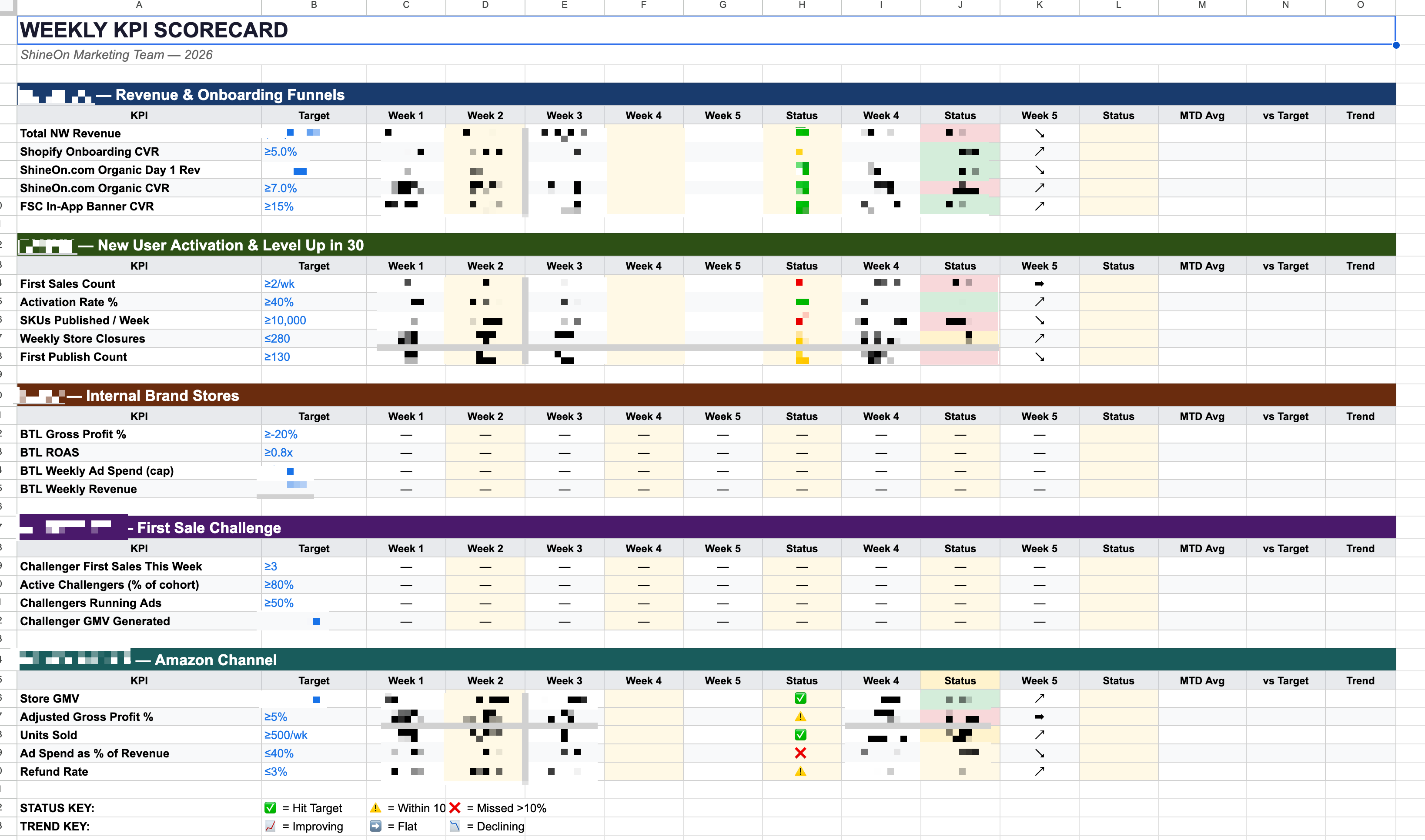
First, I downloaded the entire Google Sheet as an XLS file, uploaded the whole thing into Cowork, and told it what I was trying to do.
Build me a KPI dashboard. I need everything on one screen. It should be color-coded with targets, weekly trends, and I want to know at a glance if we’re on track or off track.👆 My elite prompting skills at work.
Cowork read through every single tab, identified the metrics that mattered most, and then asked for access to my browser.
Mmm... okay…?
And then I watched it open the actual live Google Sheet. Not the file I’d downloaded.
The LIVE sheet 🤯
It created a brand new tab inside the spreadsheet and started flummoxing (or whatever Claude does, exactly). It was like magic. Status indicators, trend arrows, week-over-week comparisons all just started popping up.
And sure as crap, by the end I had one screen with everything I needed.
I could hardly believe it. In the space of 20 minutes, I just sat there and watched this thing click around in my spreadsheet and build something that would have taken me 4 - 6 hours.
Husband of the year material
Now here’s one more example where Cowork blew my mind:
My wife homeschools our kids.
I mean, really homeschools them. She doesn’t park them in front of a computer or anything of the sort.
Once a month she sits down and plans out the next month of curriculum. She’s sorting through 12 PDFs, supplementary materials, worksheets, reading content. Some of these are a hundred pages long.
Then, all of it has to get organized into a 12-day lesson plan.
It takes her about 20 hours over a weekend.
So, I see her visibly stressed, trying to wrangle all this information into a coherent lesson plan for an 8-year old.
Being the charming husband I am, of course I wanted to help.
So, I got all the files from my wife, uploaded everything into Cowork, and described what the daily schedule should look like. I explained which subjects go on which days, how long each block should be, what order the material should flow in, etc.
Cowork read all 12 PDFs, organized them by subject, and built the entire 12-day curriculum in a snap 🫰
It was color-coded, layered in the right order. Had checkboxes, discussion prompts, popcorn reading, everything.
Twenty hours of weekend work. Done in like, 40 minutes.
Now, back to what I was saying earlier...
I think THIS is the part everyone gets wrong about Cowork.
You’re not handing off a task and walking away. You just get promoted to director.
You figure out what you want, you describe it clearly, and Cowork builds things you didn’t previously have the skills (read: time, patience, or energy) to build yourself.
How to get started
You need two things:
The Claude Desktop app and
A paid plan. I’d recommend going with Pro. It’s just $20/month.
Step 1: Install Claude
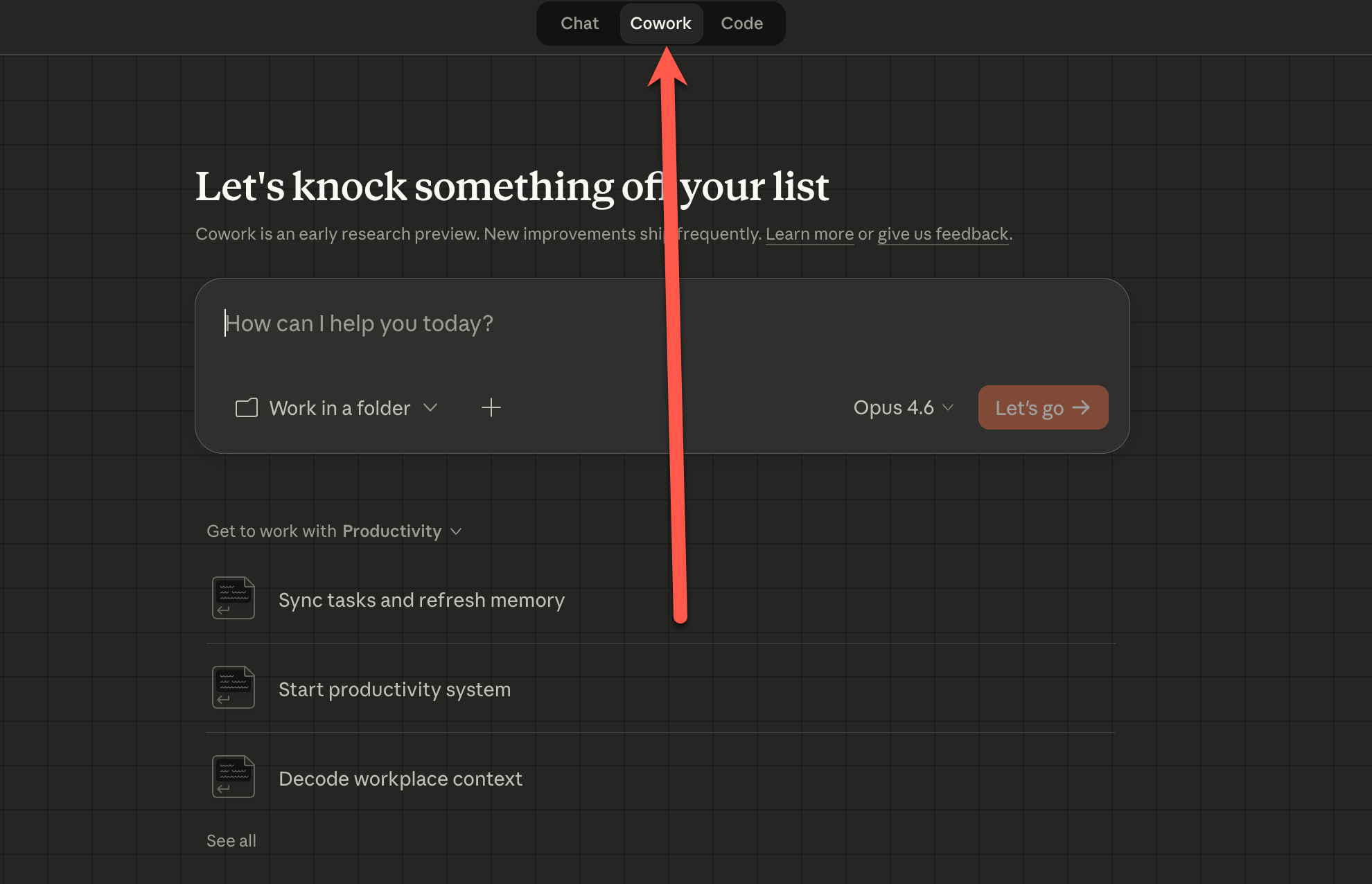
Go to claude.ai/download and install it. Open the app. You’ll see a mode selector at the top. Switch from Chat to the Cowork tab.
Step 2: Set up a working folder
Create a folder on your computer. Call it whatever you want. “Claude Cowork” is fine.
Look right below the chat box. You’ll see a button that says “Work in a folder.” Click that and point it at the folder you just created.
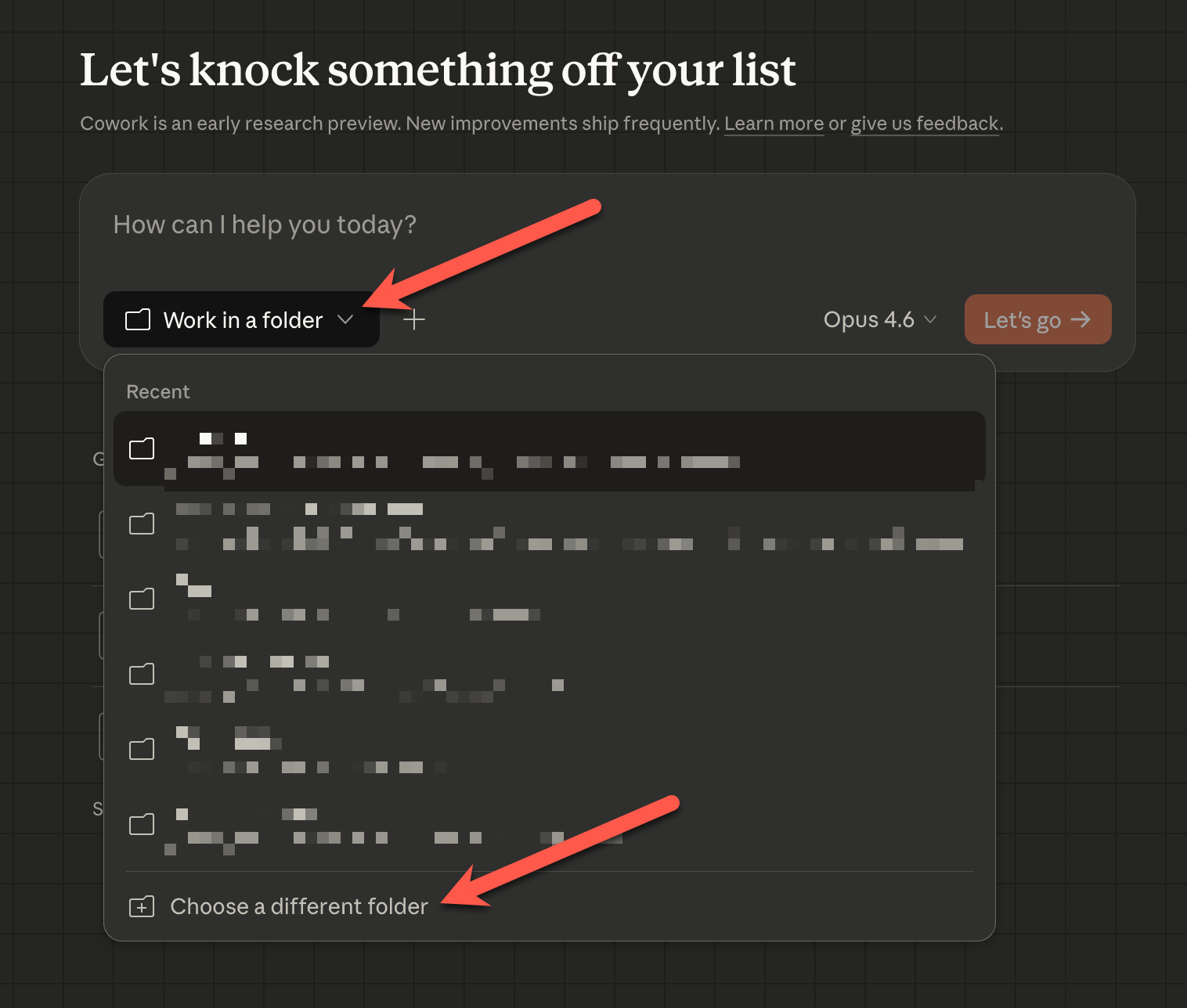
This is where Cowork reads from and writes to. Put your files here.
The spreadsheet you want analyzed, the PDFs you want organized, whatever raw documents you want turned into something useful.
You can also upload files directly into the chat window, but I find it easier to just put everything in the folder so it’s all in one place. When Cowork creates something, it saves it right back to that folder.
Step 3: Tell it what you want
This is the most important part. Don’t try to figure out all the steps Cowork needs to take. Figure out what you want and let Cowork figure out the steps.
Remember, you’re the director. Hold the vision for the end result. That’s your entire job.
Start simple and try this:
Create a text file in this folder called "hello.txt" that says "Hello, world!"Go check your folder.
Ta-da! It’s there.
Cowork just did something on your actual computer. Not in a chat window. On your filesystem.
(Eat your heart out, ChatGPT!)
Once that clicks, you’re ready for real work.
Now, time to level up. Drag in something real. That spreadsheet you’ve been staring at. The PDF you’ve been putting off. Whatever raw files are sitting in your downloads folder right now. Then tell Cowork what you want.
I like to structure my prompts like this:
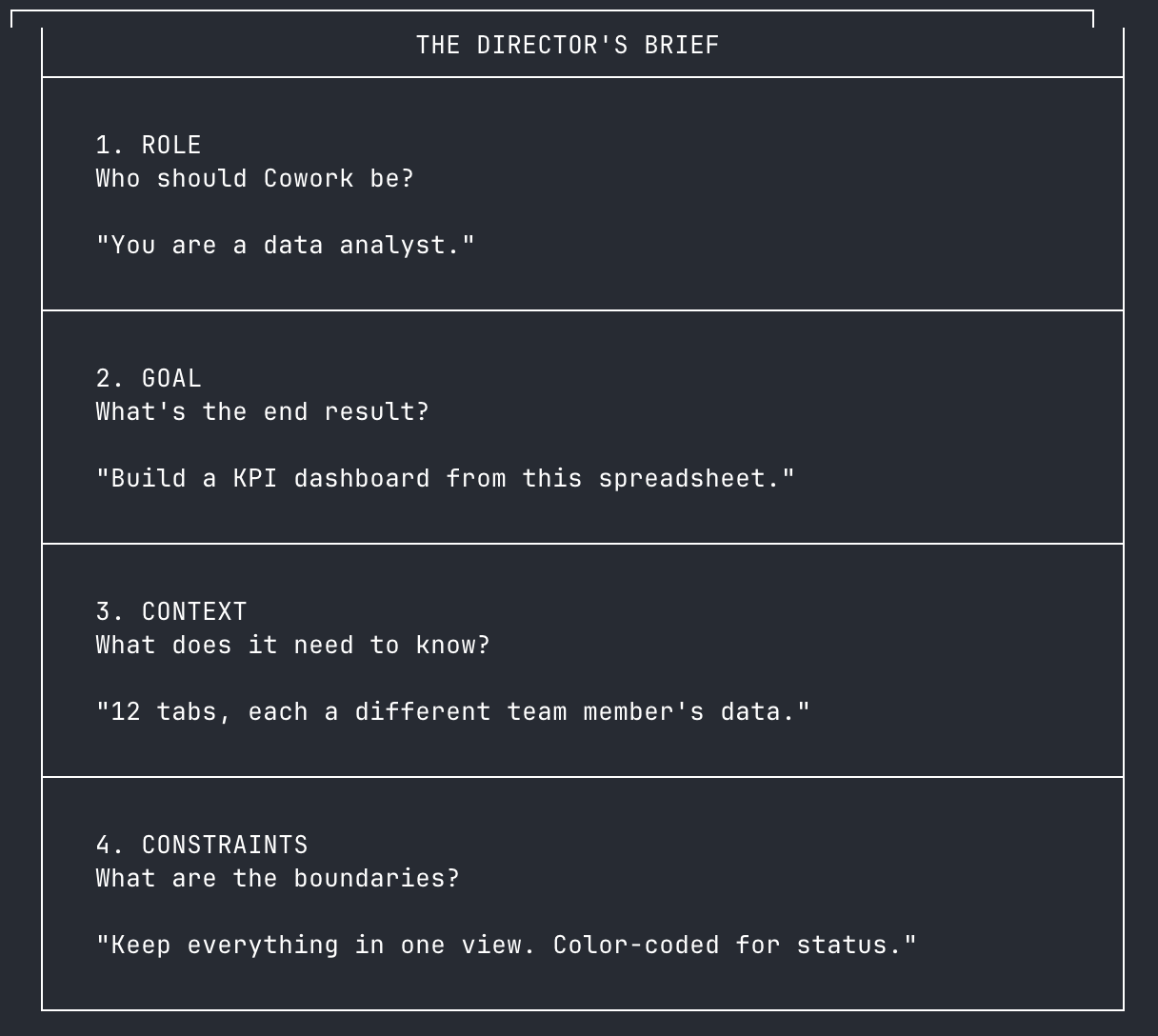
Role: “You are a data analyst”
Goal: “I want you to build a KPI dashboard from this spreadsheet”
Context: “I’ve uploaded a marketing tracker with 12 tabs. Each tab is a different team member’s data.”
Constraints: “Keep everything in one view. Use color coding for status.”
I call it the Director’s Brief.
Role, goal, context, constraints. I didn’t make it up though, I just ripped the best ideas from different prompting structures I’ve seen before.
It works for spreadsheets, PDFs, reports, planning docs, you name it.
If what you’re asking for is complicated, add one line to the end:
Before you start, show me your plan.Cowork will lay out the steps it’s going to take and you can gut-check it before it runs off and does something wild.
Once you’re really comfortable, you should go check out Plugins and Connectors.
Plugins are like specialized knowledge for your role, and Connectors help you connect Cowork to live data from Slack, Google Drive, and more.
You can find both in the settings.
Now, go build something
So, my entire paradigm is shifting. A few weeks ago, I was clicking through spreadsheet tabs like a peasant, trying to build my own dashboards.
Now I describe what I want and Cowork builds it.
I promoted myself to director. If you follow the steps above, you can give yourself a promotion too.
Now, go build something!
Take care & see you in the next one ✌️
Michael
P.S. If this was useful, subscribe or drop a comment. It’s free for you and a huge boost for me. 🙏
The last thing I’m going to do is give AI unfettered access to my computer.
My wife also homeschools our kids, and sounds a lot like your wife. Full semester planning, Singapore Math, Logic of English, etc. I also teach “Coding with Dad” every Wednesday.
I’m going to borrow this one to get homeschool set up in Cowork.