

How to Turn ChatGPT Into Your Personal AI Assistant (Step-by-Step)
One file changes every answer ChatGPT gives you

Hey 👋
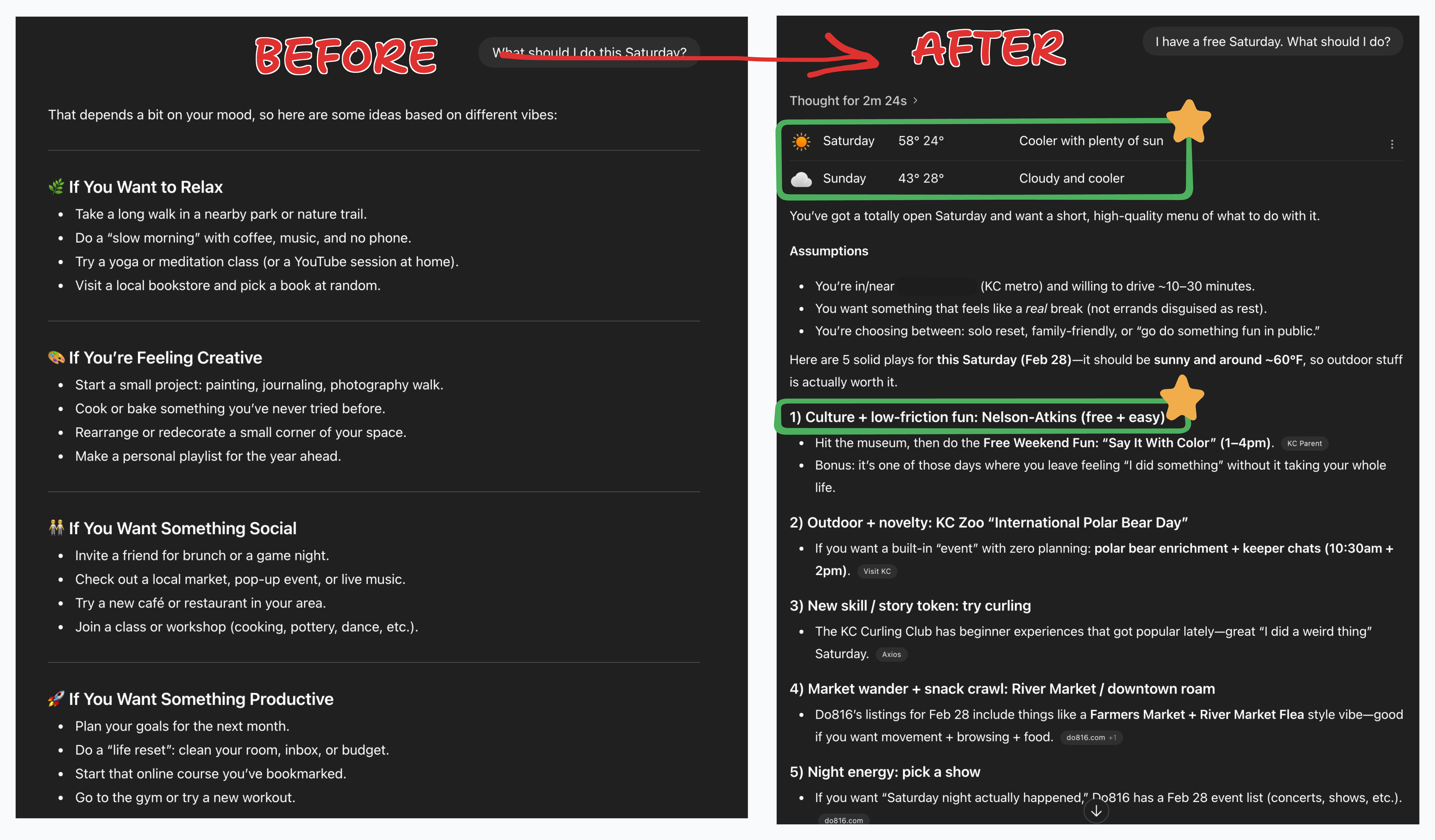
Last week I asked ChatGPT what I should do with a free Saturday. It pulled the weather in my city (because it knows where I live), found a free kids’ art event at a nearby museum (because it knows we homeschool), and then built me a full itinerary for the day.
ChatGPT doesn’t do this out of the box. But I spent 15 minutes setting up one simple thing, and now it does it every time. I’m going to show you how today.
One simple file tells ChatGPT who you are. After that, every answer is written for you instead of for everyone.
You don’t need to code anything. I’ll walk you through the whole thing.
(Want the shortcut? I built a prompt that creates the file for you. Click here.)
Back to vanilla
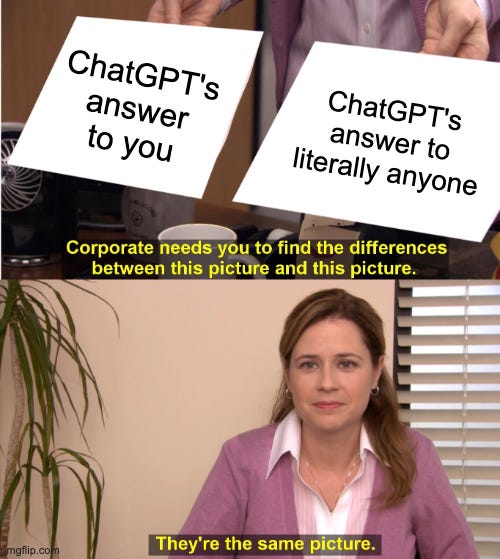
You’ve been here.
You ask ChatGPT for a movie recommendation and it gives you whatever Marvel thing is trending right now because it has no idea what you actually like. You ask for meal ideas but it doesn’t know your diet. Vacation suggestions but it doesn’t know your budget. Help with a tough situation at work but it doesn’t know your role, your team, or any of the relationships involved.
Every answer is safe for everybody and useful to basically nobody.
You can wrestle with it. Add more detail, re-explain your situation, try to steer it somewhere specific. But it always drifts back to the average. Back to vanilla.
Honestly, using ChatGPT out of the box is like meeting someone for the first time and asking them for specific life advice. It’s just not going to work.
The feature nobody opens
ChatGPT already has the tools to do this. They’ve been sitting right there for over two years.
Projects and custom instructions. Most people have never opened either one. And the ones who have usually typed a few sentences into custom instructions and gave up when nothing changed.
Here’s what actually works.
You create a project called YourNameHQ.
Think of it as a closed container where every conversation is filtered through what ChatGPT knows about you. You load it with one file, a structured profile about who you are, how you think, what you care about. Then you set custom instructions that tell ChatGPT to reference that file every time.
Yes, ChatGPT already tries to remember things about you in the main chat. But that’s like talking to a friend at a crowded party. It only gets so personal, it only remembers so much, and there’s always a veil there. A project is the same friend, one-on-one, behind closed doors. That’s where it gets personal.
One project. One file. A few lines of instructions. And ChatGPT stops talking to everyone and starts talking to you.
How to build YourNameHQ (15 minutes)
Step 1: Create the project
Open ChatGPT. On the left sidebar, click New Project.
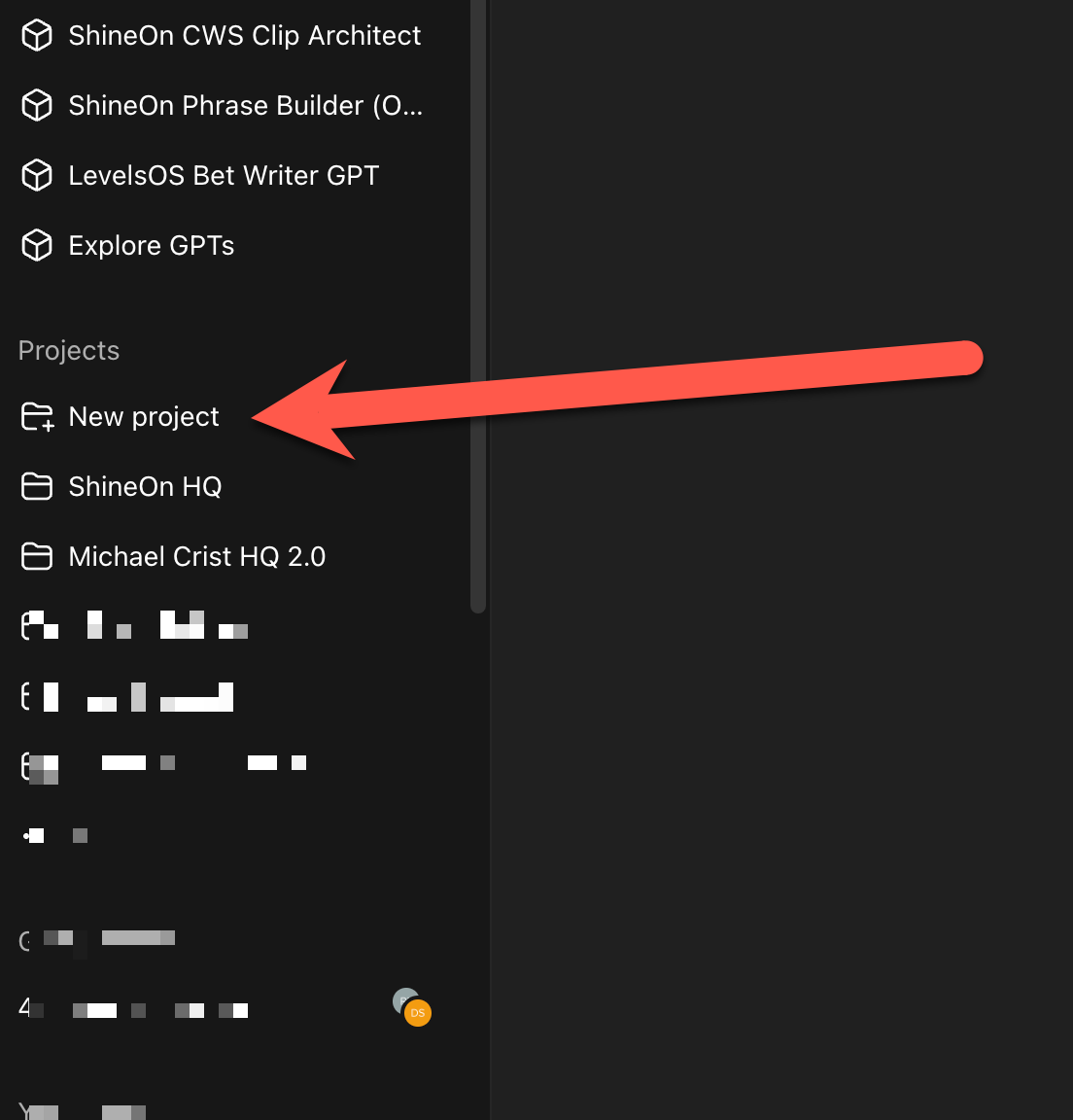
Name it YourNameHQ (or whatever you want... John Doe HQ, Sarah Smith HQ, you get the idea). Click Create Project.
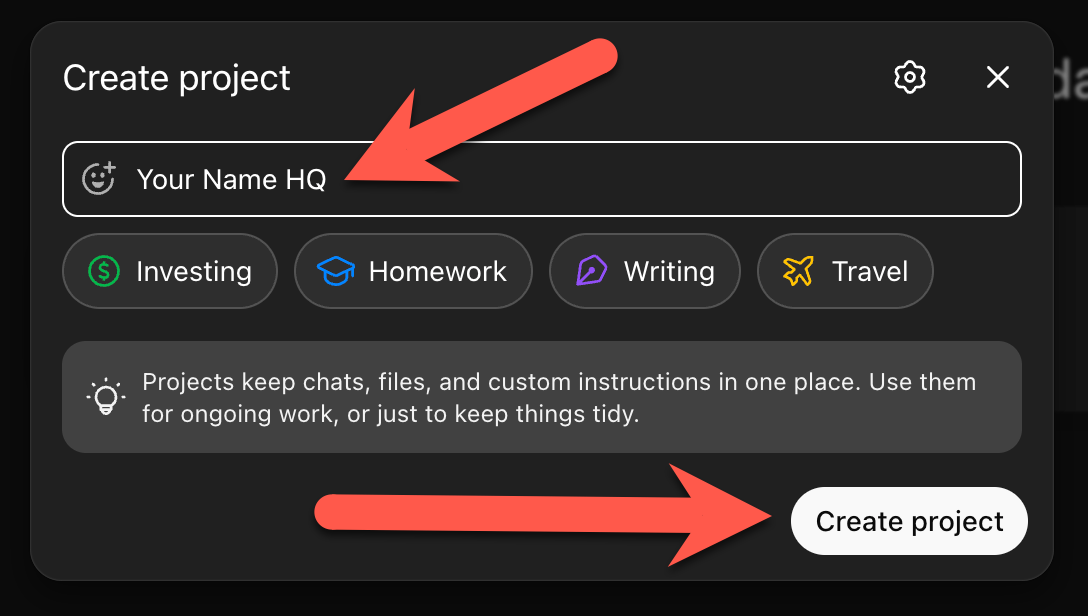
Step 2: Run the interview
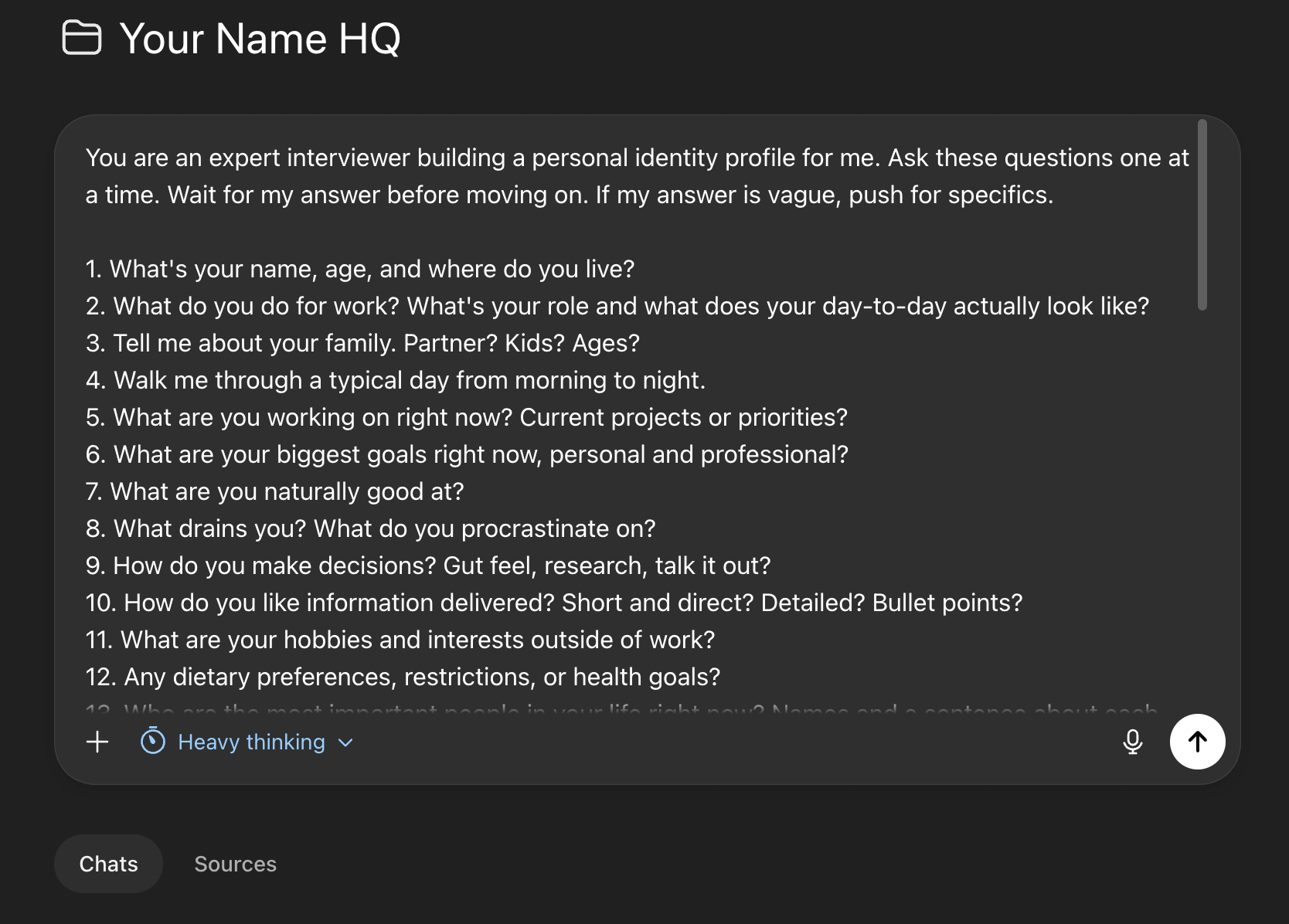
Paste this prompt into your project. ChatGPT will interview you, about 20 questions, one at a time. Takes roughly 10 minutes. Be specific in your answers. The more real detail you give it, the better your results get.
You are an expert interviewer building a personal identity profile for me. Ask these questions one at a time. Wait for my answer before moving on. If my answer is vague, push for specifics.

1. What's your name, age, and where do you live?
2. What do you do for work? What's your role and what does your day-to-day actually look like?
3. Tell me about your family. Partner? Kids? Ages?
4. Walk me through a typical day from morning to night.
5. What are you working on right now? Current projects or priorities?
6. What are your biggest goals right now, personal and professional?
7. What are you naturally good at?
8. What drains you? What do you procrastinate on?
9. How do you make decisions? Gut feel, research, talk it out?
10. How do you like information delivered? Short and direct? Detailed? Bullet points?
11. What are your hobbies and interests outside of work?
12. Any dietary preferences, restrictions, or health goals?
13. Who are the most important people in your life right now? Names and a sentence about each.
14. What do you value most?
15. What frustrates you? Pet peeves?
16. How do you learn best? Reading, video, hands-on, conversation?
17. What does your ideal week look like?
18. What are you trying to figure out right now?
19. What do you specifically want AI to help you with?
20. Anything important about you that I haven't asked?

After all questions are answered, generate two outputs:

OUTPUT 1 — IDENTITY PROFILE
A structured document titled "[Name] Identity Profile" with these sections:
- Overview (name, location, role — 2-3 sentences)
- Work & Career
- Family & Relationships (use real names)
- Daily Routine
- Goals
- Strengths & Weaknesses
- Communication Preferences
- Interests & Lifestyle
- Health & Wellness
- Values
Be specific and detailed but summarize my answers — don't transcribe them word for word. Keep the full profile under 2 pages.

OUTPUT 2 — CUSTOM INSTRUCTIONS
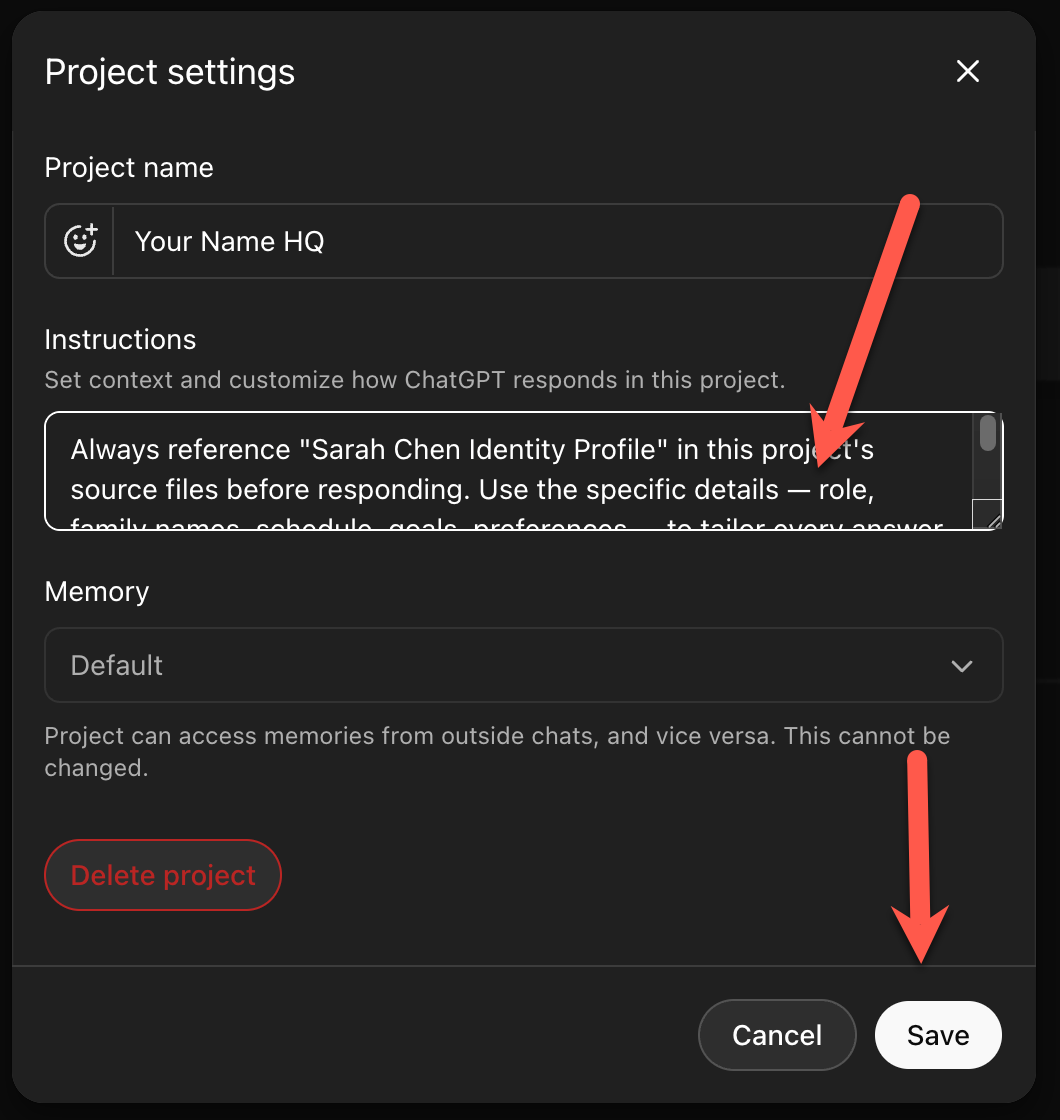
Write 3-5 lines of project instructions that tell ChatGPT to:
- Always reference "[Name] Identity Profile" in this project's source files before responding
- Tailor all answers to my specific situation, preferences, and context
- Be direct and specific, not generic
- Ask clarifying questions when a request is ambiguous
When the interview is done, ChatGPT will give you two things: an identity profile and a set of custom instructions. Keep that window open.
Step 3: Save the identity file
Copy the identity profile. Name it exactly as the prompt titled it (e.g., “Michael Crist Identity Profile”) so the custom instructions can find it. Inside your project, click Sources, then Add.
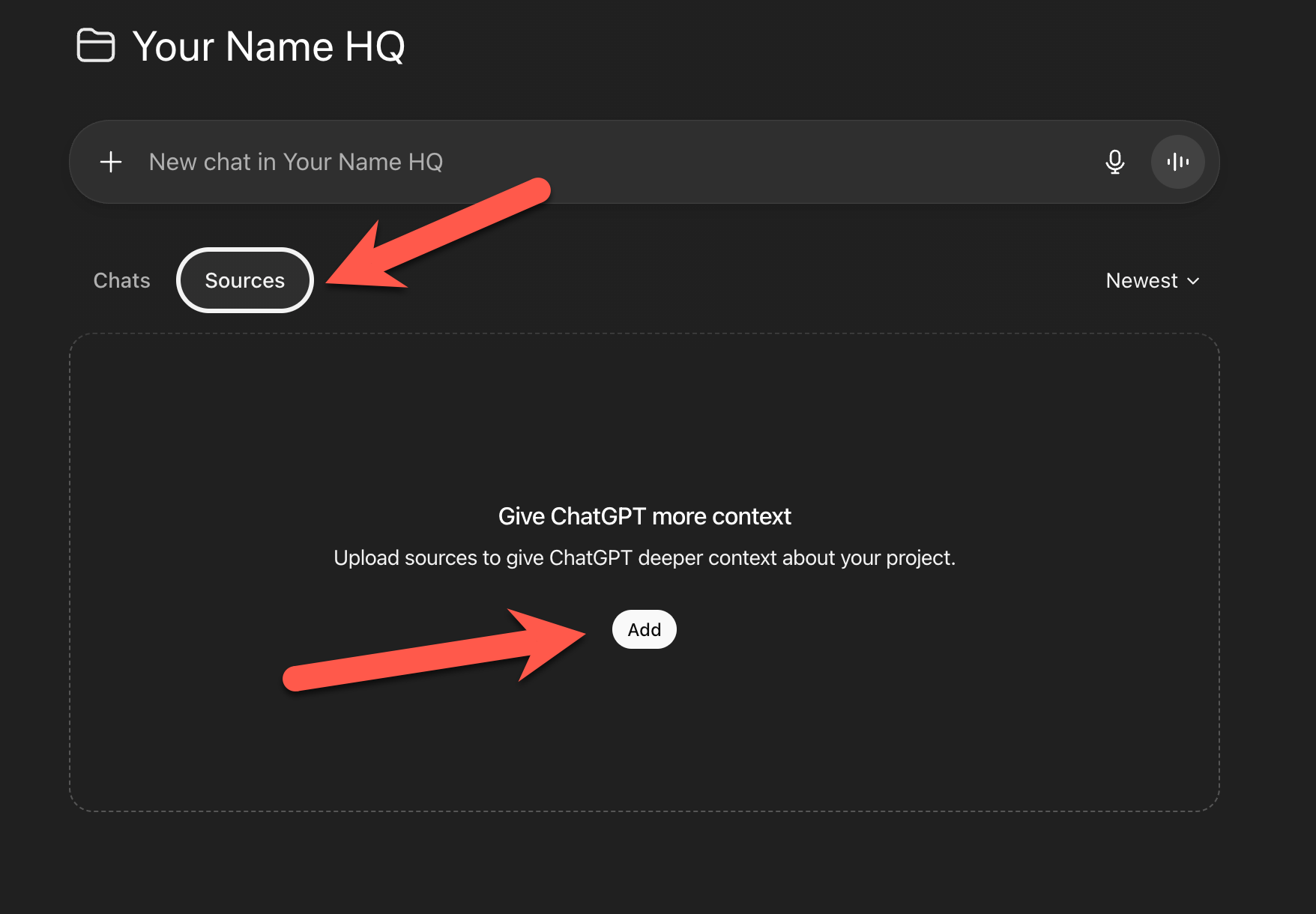
You’ll see a popup with two buttons: Upload and Text Input. Click Text Input.
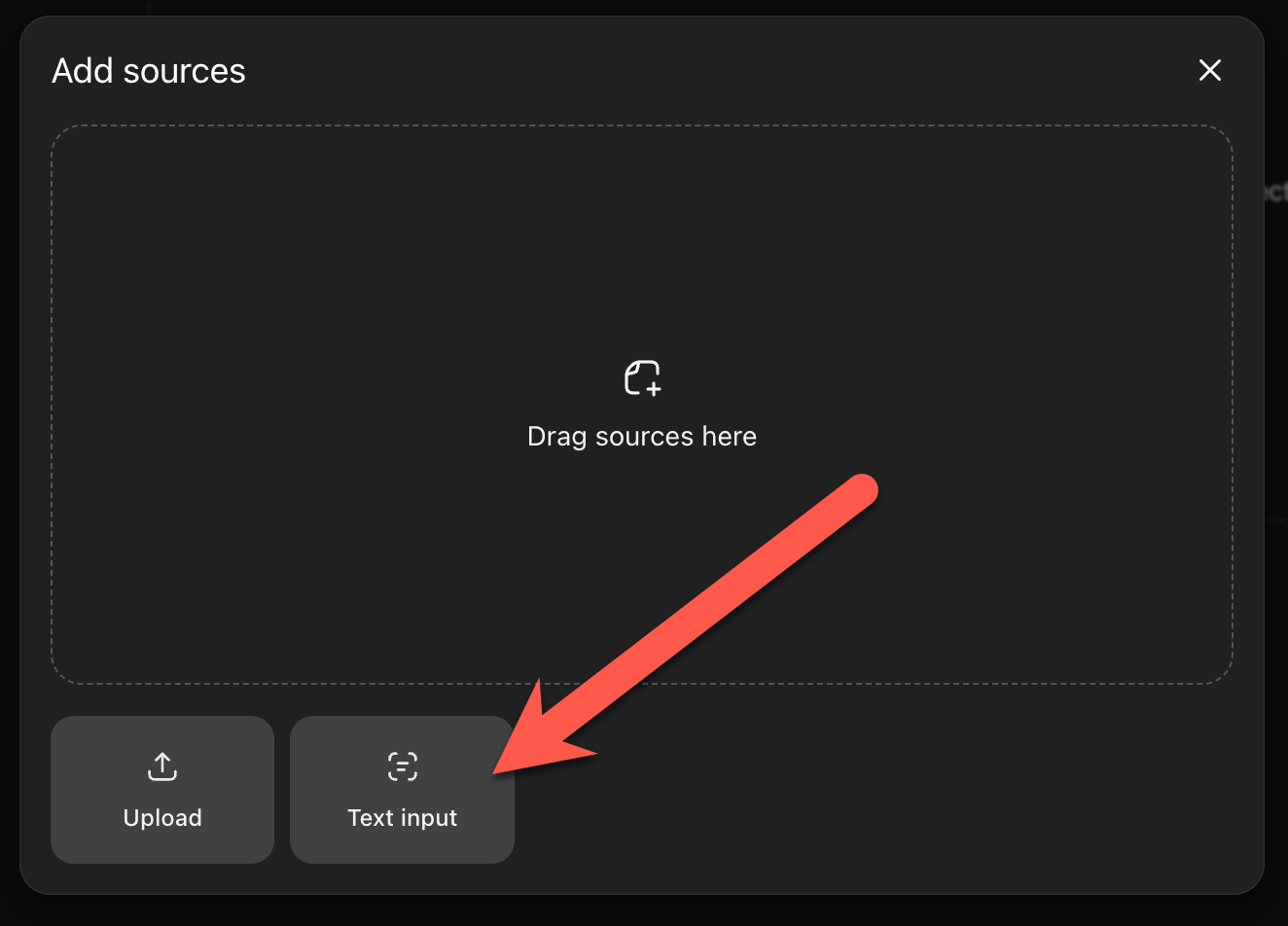
Paste the profile. Click Save.
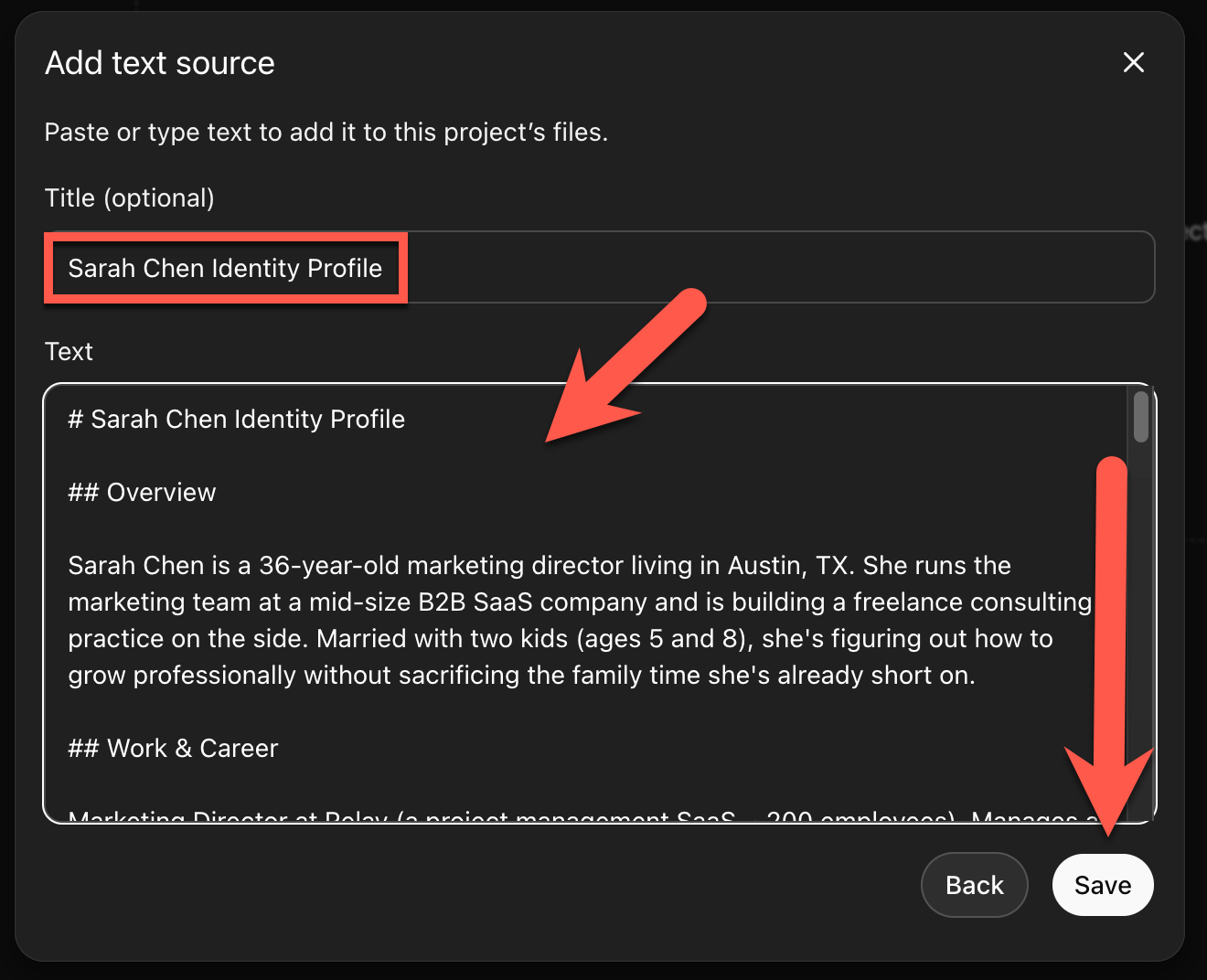
That file is now loaded into your project. ChatGPT will reference it in every conversation inside YourNameHQ.
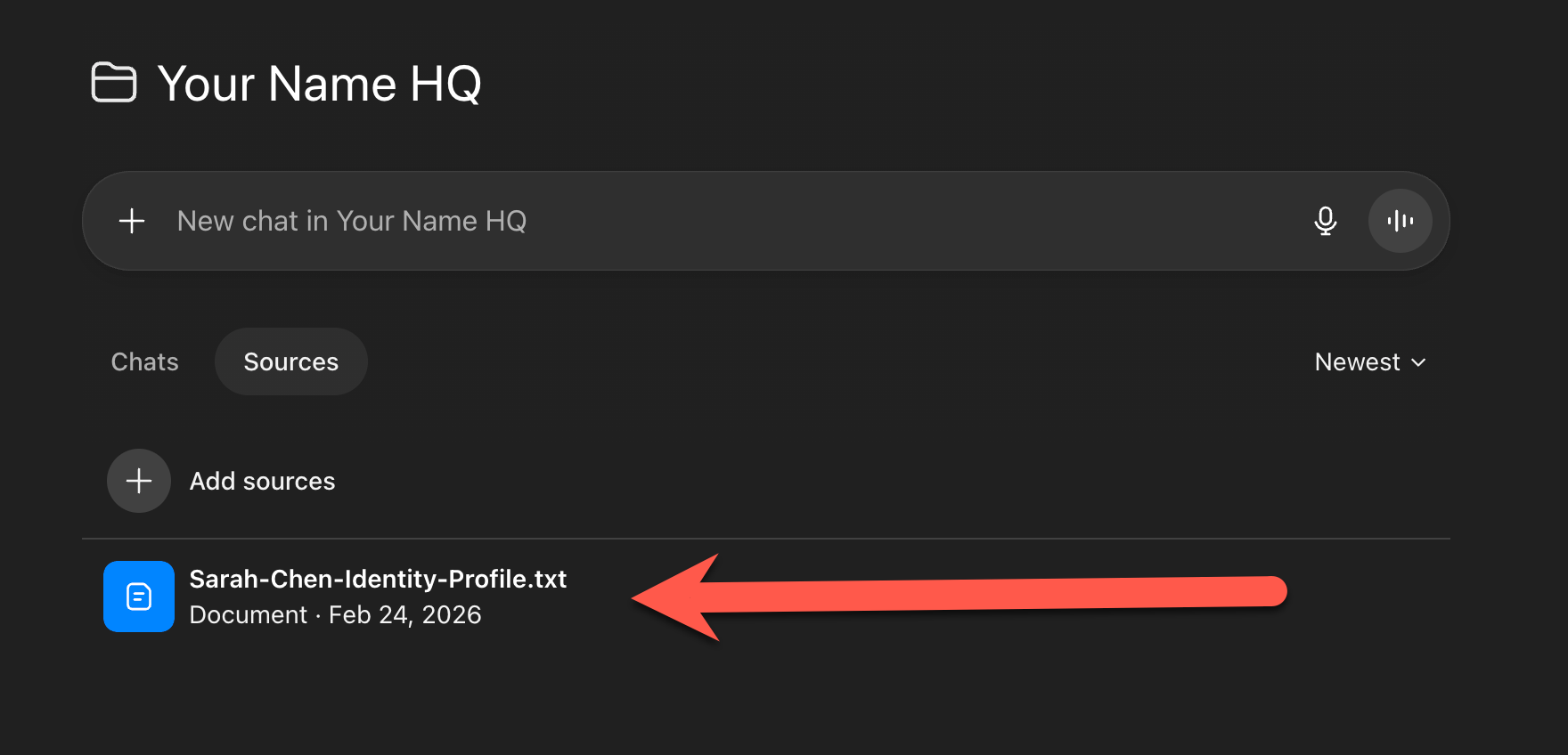
Step 4: Add the custom instructions
Click the three dots in the top right corner.
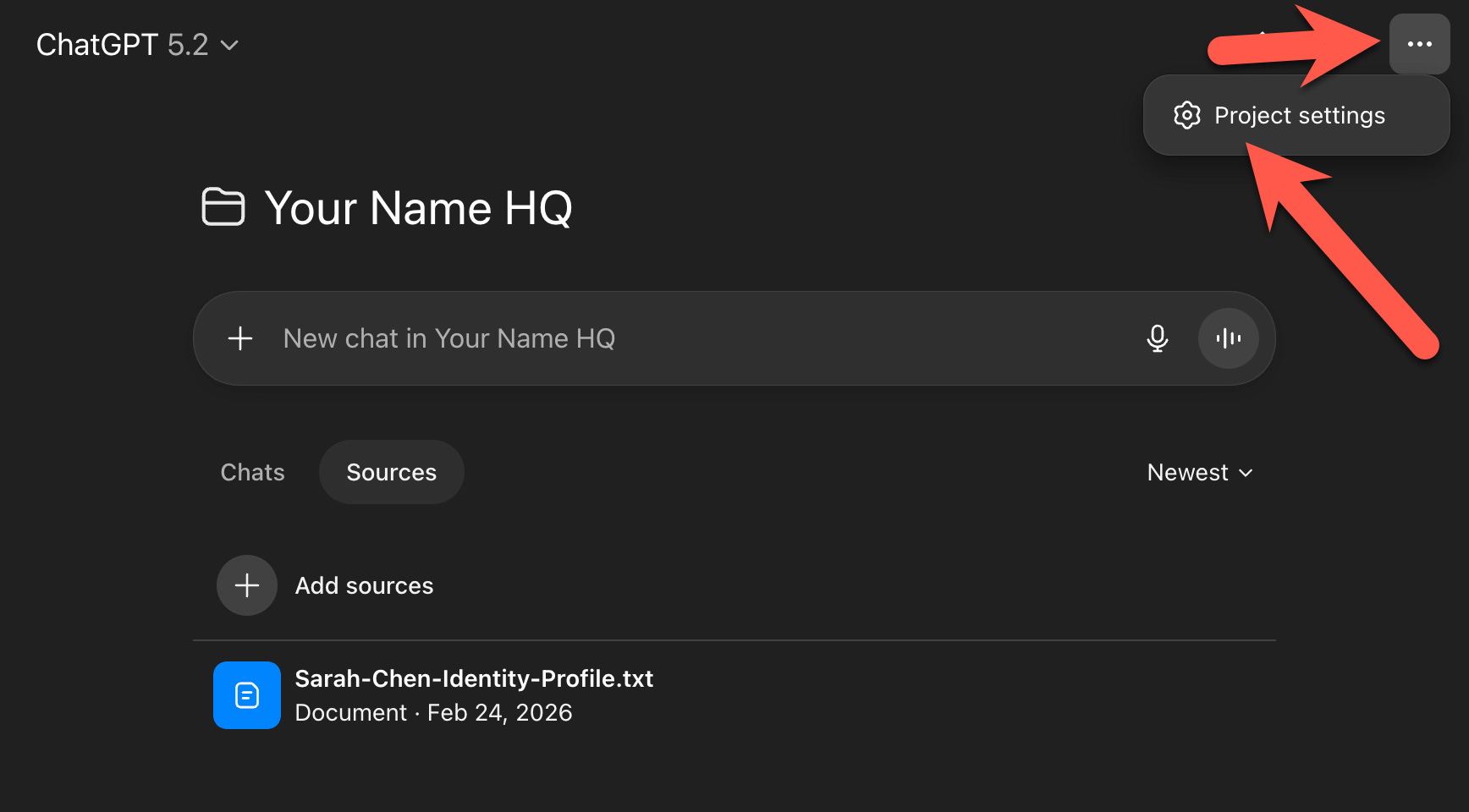
Click Project Settings. Paste the custom instructions from the interview output into the Instructions field. Click Save.
Step 5: Test it
Ask it something you’d normally ask ChatGPT. A movie recommendation. What to cook tonight. How to handle a tricky conversation at work. Compare the answer to what you’d get in the main chat.
You’ll feel the difference immediately.
Over time, add more files to your project. Personality assessments, dietary preferences, relationship context. YourNameHQ just gets smarter the more you add to it.
That’s it
You just turned ChatGPT into a personal AI assistant.
Just 15 minutes and one file. And honestly, every conversation after this feels completely different. You’re not going to want to go back to the main chat.
If you found this useful, it’d mean the world to me if you subscribed, restacked, or dropped a comment. All of that’s free for you but a huge boost for me, and I’d really appreciate it.
Take care & see you in the next one ✌️
Well laid out. Even a dinosaur like me was able to set it up. I went with opportunistic and needing structure to complete tasks as my flaws to monitor
Thank you so much about this! AI could be a great tool if you learn how to use it