

How to Set Up Claude Code for Knowledge Work (Not Just Coding)
Context engineering > prompt engineering

I fired the same employee 90 days in a row. Then I hired him back every morning.
He’d start from a blank slate. No recollection of yesterday’s projects, no clue what my company does, and no idea what I’d asked him to build last week.
So I’d spend the first 30 minutes re-onboarding him. Every. Single. Day.
Imagine having to show a new hire where the coffee machine is every morning.
By the time I got to actual work, I was already annoyed.
His name is Claude. You probably know him as Claude Code.

I did this for weeks before I realized:
This isn’t a Claude problem, this is a context problem.
Most people use Claude Code like a calculator. They type in a question, get a mediocre answer, and move on. But Claude Code out of the box is about 10% of what it can be, and the reason it feels underwhelming isn’t because the AI is bad.
It’s because you’re not giving it anything to work with.
I figured out how to fix that permanently, and it’s changed how I use AI for everything.
Context is King
There’s a name for what’s actually going on here. The AI community calls it “context engineering,” and it’s quietly replacing “prompt engineering” as the thing that really matters.
Andrej Karpathy, the guy who built Tesla’s self-driving AI and helped start OpenAI, calls it “the delicate art and science of filling the context window with just the right information for the next step.”
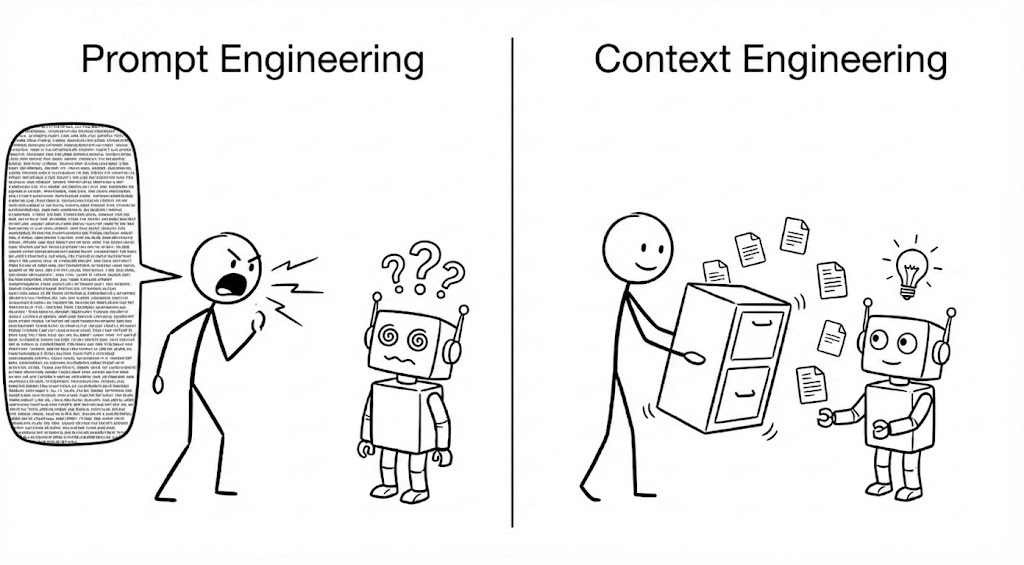
The idea is simple. The AI is already smart enough. The bottleneck is the information you’re feeding it.
And this hits knowledge workers hard. Claude Code was built by developers for developers. It already understands coding languages, frameworks, and naming conventions. When you drop it into a folder full of code, it can figure out what each file does, how they connect, and what the functions are for because there are standards and patterns that exist across the entire development world.
But knowledge work doesn’t have that.
Every business is unique. Every project is organized differently. Every person has their own way of structuring information. Claude Code has no prebuilt framework for understanding any of it. Everything is new to it every single time you open a session.
So it’s not that Claude Code isn’t powerful enough for knowledge work. It absolutely is. You just have to feed it a ton of relevant context before you get anywhere near its full potential.
A brilliant employee with amnesia
Here’s how I think about it:
Claude Code is the smartest person you’ve ever worked with... who wakes up every morning with total amnesia.
The raw ability is there. It can write, analyze, build, and research at a level most people haven’t experienced yet. But if you drop it into your work it won’t automatically know who you are, what you’re working on, what your company does, or where anything lives.
It’s power without orientation.

To fix this, it needs a map. It needs context. And the best way I’ve found to manage context is by using a tool called Obsidian.
Obsidian is a markdown editor. Think of it like a personal wiki for your entire life. Notes, projects, meeting notes, decisions, ideas, all stored as plain markdown files on your local machine. I’ve been using it for years, long before Claude Code existed.
(That wasn’t a genius move on my part. I just got lucky.)
But it turns out markdown files are exactly the type of context AI wants to eat. They’re tiny, they’re structured, and Claude Code reads them natively without any conversion or special formatting. Unlike a .doc or a Google Doc, which has frontmatter and other junk Claude has to wade through, markdown files are just text.
And because Obsidian stores everything locally on your filesystem, Claude Code can access all of it instantly. It doesn’t have to go through the internet to retrieve and download your files from the cloud. There are no integrations or permission issues. It’s just files in a folder.
And here’s the thing that convinced me this isn’t just some hack I stumbled into:
Anthropic, the company that makes Claude, built their own tool’s instruction system on markdown files. CLAUDE.md, the file that tells Claude Code how to behave, is a plain markdown file that lives right alongside your work.
The architecture they chose for their own product is the same architecture I’m describing.
Nobody told it to do that
Let me share an experience that shows the real value of giving Claude Code context like this.
Once I realized context was my problem, I created a new Obsidian vault for work. I built a file structure that made sense to me, filled it with company docs, project briefs, people files, task lists. And then I pointed Claude Code at the whole thing and said “read this and make sense of it.”
It read everything, built a mental model of the entire project, and from that point on I just started working with it. No more onboarding or loading context. It already knew.
That in and of itself was pretty awesome... but then it started doing things I didn’t expect.
It highlighted discrepancies between project files, found inconsistencies in timelines, and it would challenge me if it thought I’d assigned action items to the wrong people. It identified patterns that were buried across multiple documents that I never would have caught because I can’t hold that many files in my head at once.
And that’s the thing I keep learning over and over with AI:
Human beings are great at creating and executing on ideas, but we’re terrible at holding and processing large amounts of information. Claude Code is the opposite. Give it the context and it holds all of it, all the time, without dropping a thread.
But then something happened that really blew my mind:
I was building a taste profile to help me with AI-assisted writing. It was a brand new document that I had just added to my vault. Without me asking, Claude drew a connection between that taste profile and some personality assessments I’d taken months ago and tucked away in a completely different folder. It pulled a correlation between my personality type and my writing preferences that I never would have seen on my own.

That wasn’t a one-time trick. It happens all the time now. That’s just Tuesday.
How to set this up
So here’s how to set this up for yourself 👇
You need four things:
Claude Code
Obsidian
A folder structure
A CLAUDE.md file
I wrote a step-by-step guide for installing Claude Code and Obsidian in this article, so I won’t repeat that here. Once you have both installed, come back and proceed with steps 3 and 4.
First, create a new vault in Obsidian. A vault is just a folder on your computer. That’s it.
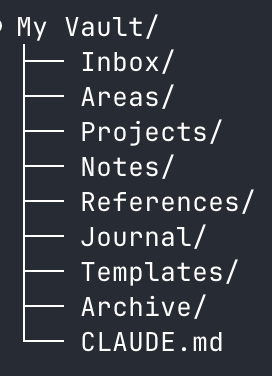
Next, build out your subfolders. These will become the structure of your vault. Here are two options depending on what you’re using it for, but feel free to create your own.
If you want a thinking partner:
If you want an operational co-pilot for work:
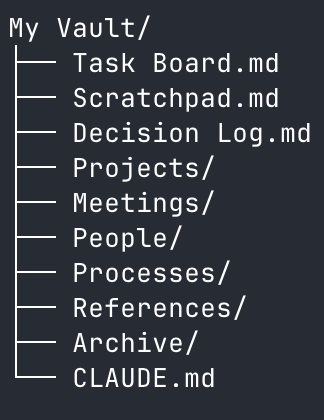
Pick whichever fits, build both, combine them, or just create your own.
Now the most important part 👇
That CLAUDE.md file at the root of your vault is your secret weapon. Claude Code reads it automatically every single time you start a session.
But here’s how most people get it wrong:
They write it like documentation. Don’t do that. CLAUDE.md isn’t documentation for you. It’s instructions for Claude Code.
Write it like you’re onboarding a new hire on their first day. Tell it who you are, what you’re working on, where to find things, and how you want it to behave.
Here’s a starter template you can copy and paste:
# CLAUDE.md

## Who I Am
[Your name, your role, what you do]

## What I'm Working On
[Current projects, priorities, deadlines]

## How This Vault Is Organized
[Brief description of your folder structure and what's where]

## How I Want You to Work
- Read the relevant folder's index.md before working on anything in it
- Ask before deleting or overwriting files
- Keep responses concise
One more thing:
Tell Claude Code to create an index.md file inside each of your main folders. The index is just a short description of what’s in the folder and what the key files are. You can do this right now. Open Claude Code in your vault and type:
Go through each folder in this vault and create an index.md file
for each one. Each index should describe what the folder contains
and list the key files inside it.
The index files are doing 80% of the work. They’re the map that tells Claude Code how to navigate your vault without reading every single file.
Oh yeah- and here’s one more tip. At the bottom of your CLAUDE.md file, add this line:
## Maintenance
- Every time you create or delete a file, update the index.md in that folder.
Now Claude becomes the librarian for all your information. It keeps its own map current without you ever having to think about it.
Once you’re set up, open your terminal, navigate to your vault folder, and type claude. That’s the command. Just claude. (If you need help with this part, the installation guide walks you through it step by step.)
For your first exercise, try this:
Ask Claude Code to read through all your notes and surface connections you haven’t seen before. I promise this one exercise will blow your mind and sell you on the system forever.
The window
Here’s what your first week looks like after you set this up:
You open Claude Code on Monday morning and it already knows. It knows your projects, your team, your priorities, where everything lives. You skip the onboarding and go straight to work.
By Wednesday, it starts catching things you missed. A deadline conflict buried across two project files. A task you assigned to someone who’s already overloaded. Connections between documents you forgot you even wrote.
By Friday, you stop thinking of it as a tool and start thinking of it as a teammate.
And you don’t need to be technical to get here. You need a folder with some markdown files, a CLAUDE.md that tells Claude who you are, and 30 minutes to set it up. Everything I just showed you, I figured out by tinkering. No coding. No computer science degree.
You have the playbook. Go build it.
Thanks - that’s great advice. I do something similar but I use Workflowy which imo is better due to its node structure. I have written an MCP server for Claude to use it - the template md file though is critical.
Thank you for this. You've made the set up really accessible for people just starting out.