

Steal My Second Brain Starter Kit
Finally, a Second Brain that runs itself (because you were never going to process those notes anyway).

I have an embarrassing confession:
I’m supposed to be the AI productivity guy, but my notes folder is a mess of 1,500+ files that I’ve never opened a second time.
Those notes represent 3 years of trying to set up a proper second brain... 3 years Tiago Forte and Zettlekasten and Smart Notes.
But every single time I was supposed to categorize, tag, and link what I’d just captured, the system broke.
The truth (I’m finally admitting to myself) is that I’m never going to have the time to do all the “processing” required to maintain a second brain consistently.
Deep down in my bones I want to... but it’s just not going to happen between a real job and a real life.
But now... finally... AI is good enough to do that processing for us.
This week, I’m giving you the Second Brain Starter Kit. It’s a simple system that consists of 3 folders and 2 prompts. All you have to do is drop files into one folder, and then AI picks them up, tags them, and makes connections across the rest of your notes.
It takes a few minutes to set up, and it’ll build you the second brain you’ve always wanted.
I walk you through the entire thing, step-by-step.
Ready?
Let’s go! 👇
Why every note system dies in a week
Most writing about second brains tries to sell you the idea that the system is the problem.
If you just had a better system, you’d finally make it work. Or it’s an app problem...
You need Roam instead of Obsidian, or Notion instead of Roam, or (back when dinosaurs roamed the earth) Evernote instead of everything else.
It’s always something. Better tagging, PARA, Zettelkasten, some new framework someone just wrote a book about. And I’m not knocking any of it. The people running the YouTube channels and writing the books are sharing what they love, and I appreciate them for it.
But for the rest of us mere mortals, none of it sticks.
The problem is the processing.
Right now I can show you 1,500 unprocessed notes sitting in my vault. Maybe 100 atomic notes behind them. That ratio has been roughly the same for three years.
(Which is ridiculous, I know).

Look, the truth is I’m just never going to do the organizing required to have the second brain I want. Took me a long time to admit that, but I finally did.
It’s the daily processing that wears me down, and the part that’s supposed to make the whole thing work is damn near impossible to keep up with.
That’s why AI is every ADHD person’s dream.
Every ADHD person I know would kill for someone to run their executive function:
Their to-do lists, reminders, prioritization, all of it.
AI can finally do a version of that. It takes the filing, the connecting, the boring structural work that was supposed to come off our plate but never did.
Now, I know the whole point of a real Zettelkasten is that YOU learn by making the connections yourself. That’s half the point.
But I wasn’t making the connections on my own anyway... so I’ll take half the benefit over zero every time.
What I’m building here isn’t a traditional Zettelkasten, it’s an automated library you can actually query. Closer to a searchable archive of your own friggin’ brain than a tool for learning through synthesis.
If atomic-note discipline is what you’re after, this won’t give you that. If a queryable pile of your own material is what you’re after, this is EXACTLY that.
Raw in, Answers out
Here’s the Second Brain Starter Kit. Anybody can use it.
It positions AI to do the work you were never going to do anyway.
It’s made up of three folders:
Raw/
Second Brain/
Answers/
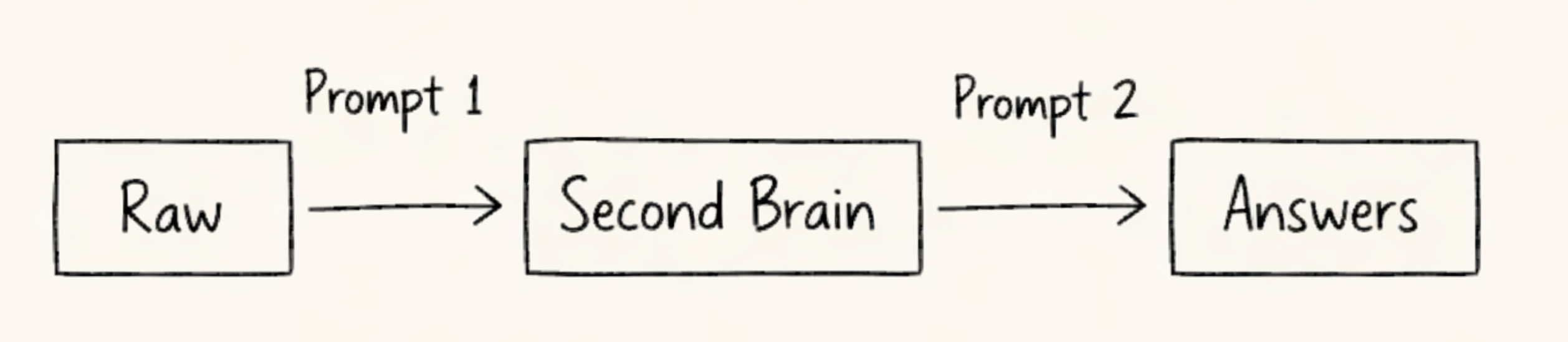
Raw is your dumping ground. This is where you can throw article clippings, voice memos, random thoughts you jotted down in the middle of the night, whatever text you’ve got piling up. No tagging, no filing, no decisions.
Second Brain and Answers are where AI takes over. You don’t need to touch either one.
When you run the first prompt (shared later), it picks up everything in Raw, adds proper tagging and front matter, and moves each file into Second Brain. It leaves your raw material mostly untouched so that your notes stay your notes. But while it’s doing that, it’s also identifying concepts and finding connections between each new file and everything else already sitting in Second Brain. Technically, this is called a “knowledge graph”.
The second prompt is where it starts to feel real. You ask a question against your Second Brain, and AI walks through all of the connections, pulls the relevant sources, and writes you back a detailed answer grounded in your own notes. Your Second Brain becomes your own private knowledge base, kinda like your own personal ChatGPT, except it only knows what you’ve fed it. The output from this prompt gets saved into Answers so you can come back to it later.
That’s everything. It’s simple enough that anybody can start using it today, flexible enough that you can bolt whatever complexity you want on top. I kept it pared down on purpose so you can add your own personality on the back end.
Watching the graph build itself
I’ve been running some version of a second brain for years. Looking at what these two prompts can do, I wish I’d had AI building the connections from day one.
Here’s what the Second Brain Starter Kit looks like in action:
I loaded Raw with a pile of messy, unorganized notes about second-brain systems themselves. Things like articles I’d clipped, studies I’d bookmarked, random thoughts about Zettelkasten and PARA. Exactly the kind of stack that normally sits in my inbox forever and never gets touched.
Then I ran the first prompt.
I watched it pull files out of Raw one at a time, add some description data, and drop them into Second Brain.
Great 👌
Working as expected.
Then it started drawing wikilinks between them.
Disconnected files suddenly had pointers at each other. And the links weren’t random. One of them connected [[Stop Losing What Matters]] to [[Why Most Knowledge Systems Fail]], and when I clicked through, the connection was legit. One note was the premise. The other was the mechanism. I wouldn’t have drawn that line myself, but it made sense the second I saw it.
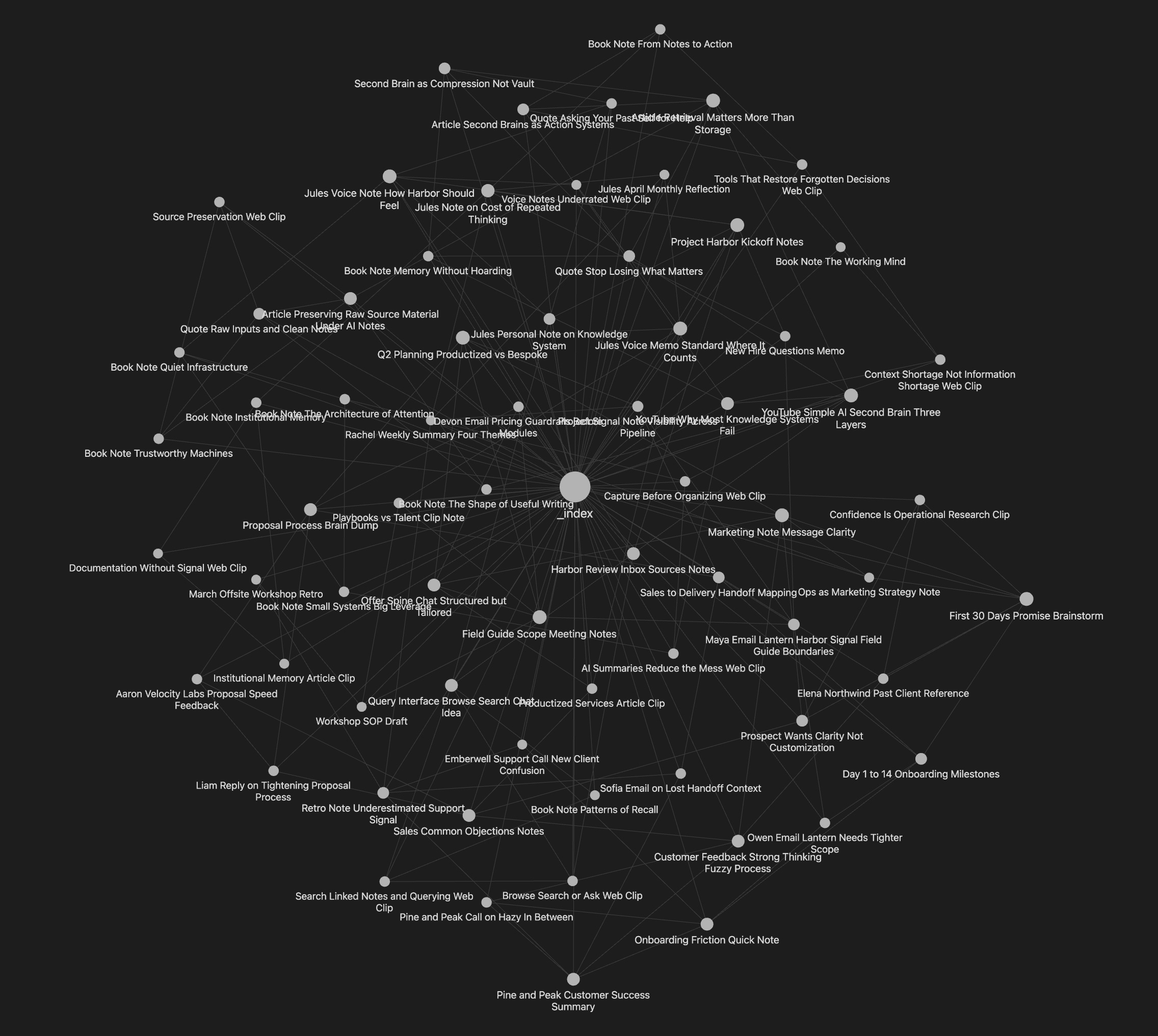
Then I ran the second prompt.
I asked a question about the material I’d just loaded. The answer came back grounded in my own notes, with wikilinks to the exact sources it pulled from. I could click any link and chase the material back to where the answer came from. If I didn’t trust the synthesis, I could verify it. If I wanted to go deeper on one thread, the source was sitting right there.
That’s where it clicked:
AI tagging my files is whatever. Anyone can figure that out. The real unlock is that AI can hold your entire second brain in context at once. It sees every relationship between every note, filters out the noise, and surfaces the ones that actually matter. That kind of cross-referencing is just not something most humans will realistically do... at least not across 1,500 files, and definitely not consistently over time.
And on top of that, you can ask questions against the whole thing and get back cited answers written in your own context, not the internet’s.
The Starter Kit
If you tried to build this yourself, you’d be at it for a while. I burned through probably fifteen iterations on the ingest prompt before it stopped over-linking every file to every other file.
The query prompt took another handful of tries before it cited sources cleanly instead of inventing titles that didn’t exist. Then there’s the folder structure, the YAML schema, and every edge case around what to do when you re-run on a file that’s already been processed.
I’ve done all that cleanup work already... and probably took around 8-10 hours.
Below are both prompts, the three folders to create, and a walkthrough of real output from my test run. If you’ve got Obsidian installed and either Cowork or Claude Code ready to go, you can have this whole thing live in five to ten minutes.
The setup
Pick or create an Obsidian vault. Any vault works. (New to Obsidian? It’s a free notes app that stores everything as plain text files on your computer. Learn how to set it up here.)
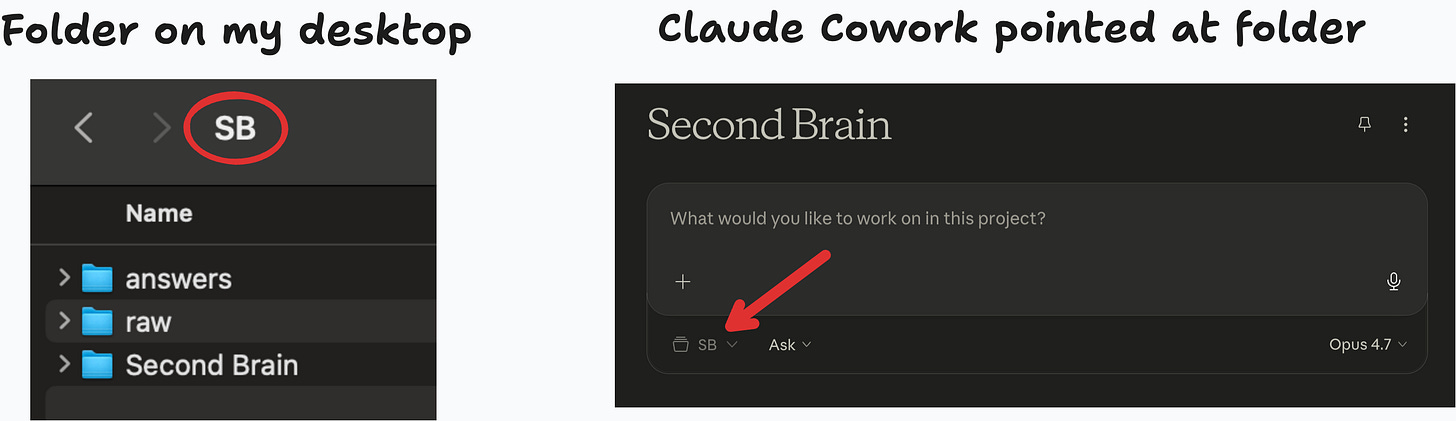
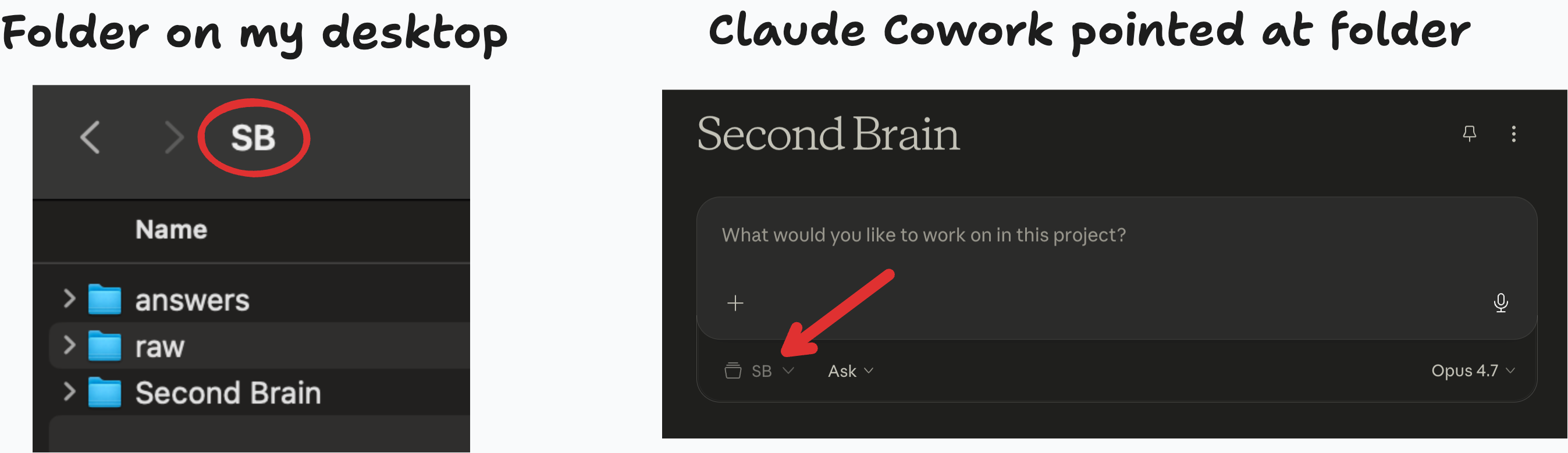
Make three folders inside it:
raw/,Second Brain/, andanswers/. Case and spelling matter. The prompts reference them directly.Open Cowork (in Claude Desktop) or Claude Code and point it at the folder containing those three subfolders. Either tool works. Both need filesystem access, and that’s what lets the prompts actually move files around.
Drop raw material into
raw/. Articles, clippings, transcripts, voice-memo text, random notes, quotes, anything text-based. You don’t need to tag, rename, or organize anything. Dumping is the whole workflow.Run the first prompt when you want to process what’s sitting in Raw. It tags your files, adds YAML front matter, builds wikilinks between them, and moves them into Second Brain. Raw empties out. The first time that happens is weirdly satisfying.
Run the second prompt when you want to ask a question. You get back a cited answer, and a new markdown file shows up in
answers/with the question, date, sources used, and the full answer. So you can come back to it later.
Alright, let’s get to the prompts.
Copy these and paste them in
Two prompts below. Each one has its own “how to use it” note. The whole kit runs on these two and nothing else.
Keep reading with a 7-day free trial
Subscribe to AI Chops to keep reading this post and get 7 days of free access to the full post archives.